Post all Tutorials HERE :D - Page 9

Created

Last reply

Replies

921

Views

328.9k

Users

278

Likes

581

Frequent Posters

Henna 786 thumbnail
20th Anniversary Thumbnail Stunner Thumbnail + 3
Posted: 17 years ago
#81

Hey

Im using Jasc animation shop 3[i think] how can i make AVIs on it?

Ive tried hunting on the net but no luck 😳

if anyone has any tutorials [with pics] please let me know 😳

i dont understand how i can add text, such as copyright, to the animation and resize it so its small. also how can i add to Siggis

Basically something like this

Henna x

Edited by Henna 786 - 17 years ago
kabee thumbnail
19th Anniversary Thumbnail Voyager Thumbnail
Posted: 17 years ago
#82

Originally posted by: Zinu29

Supplies Needed: PSP , Animation Shop ! :)

Okay , This is a tut , on how to add two video avi's together !

Lets start off with how to make a video avi !

Follow this link , to help you teach how to make a normal video avi !

(Just scroll down) http://www.india-forums.com/forum_posts.asp?TID=504625&T PN=5
^^This , is thanks to Nabibah ! For the Great Tut , and letting me use this , to inform other people of this wonderful tutorial ! :)

Now: How to add Border's , and text , to each frame !

Step One: Open a new image , of these dimentions in PSP !

Step Two: Go to Image>>Add Borders. Now a window will appear ! Change your setting as mine !

Step Three: Okay , Now ! Follow Step Two , but , fill in these dimentions !

Step Four: Repeat Step Two !

Should look like this now !

Step Five: Launch Animation Shop !

Step Six: Now copy your Border image , and paste it into Ani Shop , and follow this !

Step Seven: Resize Animation !

It should look like this now !

(But , with the background erazed)

Step Eight: Use this button to duplicate , duplicate this to 27 Frames (atleast) !

Step Nine: Now Select All of your pictures , and select all of your duplicated border , and drag the border onto the first image of the vid avi , and let go , when u have the position , you want it in , and it will automatically be posted in all of the frames !

It should look like this now !

Step Ten: Now , do the same for text , exceot for adding border's , add text !

Step Eleven: Now open a new image (in ani shop) with these dimentions !

Step Twelve: Now duplicate your new image , like you did with your border , with the number of frames you want ! And , now , press ctrl+a , and then drag your vid avi !

Like this:

Step Thirteen: And , now , you can repeat ! for the second avi ! :)

After you're done , Go to View>>View Animation !

And , if you're satisfied with your result , go to File>>Save As>>Save it as a .GIF File ! :)

And , you're done ! :)

Need any further information , of help , please ask !

Regards ,

- Zinu ! :)

Hi..i gotta question..u noe on step six..how it says to replace color right..buh when i go there and click okay..it says: the color you have selected to be replaced does not exist in the frames you have selected..what shuld i doo? =S

neha28 thumbnail
19th Anniversary Thumbnail Rocker Thumbnail + 3
Posted: 17 years ago
#83

Originally posted by: vishlesha

how can i put more than one avatars in my profile..i can add one but no more than that can someone plzzz tell me how to do it


hi vishlesha....there is only one space for a avatar to appear...if u want to place 2 or more thn u hav to join all the pics of ur avatars and thn save it all as one file...thn u will b able to post several avatars at a time...u can do this in paint...its very simple...


neha28 thumbnail
19th Anniversary Thumbnail Rocker Thumbnail + 3
Posted: 17 years ago
#84

Originally posted by: vishlesha

could you explain how??? please


well....multiple video avatars cannot be posted....for instance i hav 3 avi and the original maker stacked thm together and so it was saved in one file...

suppose u have 2 picture icons like these:::
and

and u want them to be together...
you simply open Paint ..then Open the first file and Copy the file, now open the second file and increase the white space by draging the outlines.

and then pasting your previous pic by Ctrl+V and then drag tht icon under the other icon....and then save ur work....


hope this will explain u it to u in more detail...n if u still cant figure it out...pm me...i'll do a more detailed one with u ther

take care
neha...
294531 thumbnail
Posted: 17 years ago
#85

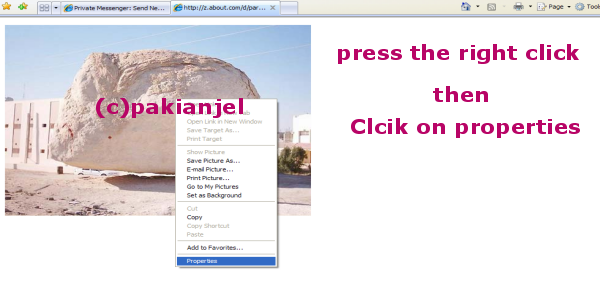
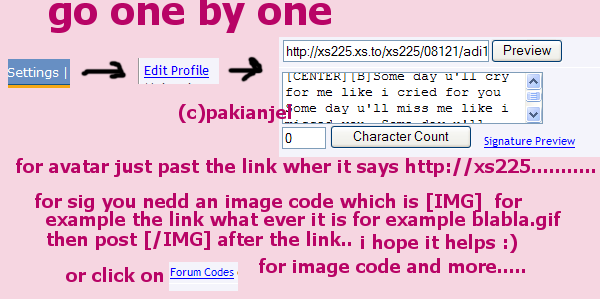
An esay tut by me

How to get the link and add an avi and signature

**Please do not copy this tut without my permission**

Easy as this😳😛

if you have any questions pm me

😛sara😛

Edited by pakianjel - 17 years ago
SabeenSmiles thumbnail
18th Anniversary Thumbnail Dazzler Thumbnail Networker 1 Thumbnail
Posted: 17 years ago
#86
can sumone plz post a tutorial on how to make video avis wid windows movie maker?
cutedia thumbnail
19th Anniversary Thumbnail Navigator Thumbnail
Posted: 17 years ago
#87
^^ Do u mean 2 avi's stack??? well if dats wad u wan here is d
Link
scroll down u'll a tut n video how 2 stack em
cutedia thumbnail
19th Anniversary Thumbnail Navigator Thumbnail
Posted: 17 years ago
#88
^^
Here is d link of making shiggy
Link
BammySammy thumbnail
19th Anniversary Thumbnail Rocker Thumbnail + 3
Posted: 17 years ago
#89

Originally posted by: miss5stars


&&
i kno how to make video avis.....BUT...... how do i add my copyrite or add a border or brushes on them?? 😕

i think i have explained a lil in my Tuts..

go check..

http://www.india-forums.com/forum_posts.asp?TID=504625&T PN=82

and and add ur [c] the simple wayy in Ani Shop ermm once you finished ur Vid Avii select all go to EFFECTS >>INSERT TEXT EFFECT...

A Box shud appear.. and hope fully u know wat u do from there..

if not .. PM ME..

Hope it help a little.. 😕😳

BengaliChica92 thumbnail
19th Anniversary Thumbnail Sparkler Thumbnail + 2
Posted: 17 years ago
#90
Tut by me...for PS only...Involves selective coloring

https://i117.photobucket.com/albums/o71/cuteiq/tutcoloring.jpg


Related Topics

Avatar and Signatures Shop thumbnail

Posted by: .StarryPhoenix · 10 years ago

This is a thread where you all can share everything anything, be it be a Tutorial, PSD, Suggestions, Textures, Animations, etc Try and avoid too...

Expand ▼
Top

Stay Connected with IndiaForums!

Be the first to know about the latest news, updates, and exclusive content.

Add to Home Screen!

Install this web app on your iPhone for the best experience. It's easy, just tap and then "Add to Home Screen".