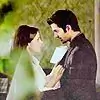
2 Colouring Tutorials for PSP!
I have PSP8, so I made it for that, Im pretty sure its the same for all PSP verisons :)

1. Duplicate Base Layer, fill it in with #FBAF77, set it to Hard Light 100%
2. New raster layer, fill it in with #313675, set it to lighten 100%
3. New raster layer, fill it in with #53E5FB, set it to soft light 100%
4. New raster layer, fill it in with #F2DDC4, set it to Burn 100%
5. Go to layers> Brightness contrast> Adjustment>Brightness-26, contrast -13
6. Go to layers> Colour balance> Adjustment>
Shadows
Cyan/red: -27
Magenta/green: 67
Yellow/blue: 87
Midtowns
Cyan/red: 100
Magenta/green: -68
Yellow/blue: -22
Highlights
Cyan/red: -5
Magenta/green: 6
Yellow/blue: 20
DONE!

1. Duplicate base layer, fill it in with #6D439D, set it to Lighten 81%
2. Make a new raster layer, fill it in with #C4B3D9, set it to Multiply 31%
3. Make a new raster layer, fill it in with #F2DDC4, set it to Burn 100%
4. Merge all layers(flatten)
5. Layer>New Adjustment Layer> Brightness and Contrast> Adjustment> Brightness: 41, Contrast: 16
DONE!
Hope you like :)
Edited by crazy_craze - 17 years ago



























 Bigg Boss 19
 Ganesh Kartikeya


850