


Post all Tutorials HERE :D - Page 3

Created

Last reply

Replies

921

Views

328.9k

Users

278

Likes

581

Frequent Posters

Piku_S thumbnail
20th Anniversary Thumbnail Stunner Thumbnail + 7
Posted: 18 years ago
#21

Originally posted by: IBserenity

Anyone have any good avi tutorials?


A Tutorial on how to make a simple Avi using Animation Shop 3
(Download a Jasc Animation Shop 3https://www.indiaforums.com/forum/avatar-and-signatures-shop/213719/tutorials-making-avatars-and-signatures )
1.) Open the Jasc Animation Shop, go to file and click new, a box will appear saying Create New Animation, type the width and the height that you want, and for canvas color select opaque and click ok


You will have something like


2.) Go to Animation and Insert From File,


A box will and make sure it has the following setting


Insert Frames From File, click Add the file
Location with frame: Centered, Fill rest of Frame with Canvas color Make sure the box is checked with Scale frame to fit and add the file

3.a.)
Click Add a file a box will appear find your pictures and open and then click Ok (or you may repeat the process until you have several pictures and then click ok to save time


4.) Next Right Click on the frame or


Or you may
go to Effect Insert Text Effect


An Insert Text Effect box will appear, click font then an add text box will appear where you can add the text, choose the font, font size and style and alignment you want then click ok

There are many types of image transition to choose from (Select customize if you want to change where your text is )


5.) Select the image, right click select Insert Image Transition

or go to effects and select insert image transition

A box will appear, and you will have something like this
and then select the transition effect that you want or you can click customize to
customize the specific image transition


You will have something like this


A box will appear, and you will have something like this and then select the transition effect that you want or you can click customize to
customize the specific image transition


6.)Select the frame, Right click Insert Image Effect (If the frame happens to already have a image transition click the last frame of the transition)

and then choose the Image Effect you want and click ok
Note It doesn't matter what image effect you first you can do either Insert Image Effect or Insert Image Transition (If you already did one of this make sure you click the last frame)
For each new transition click the last frame of the previous transition and continue
7.) Go to file and save


When it optimizes the file this will appear keep on pressing next until you are done


Then you are done
You can upload the avis at
https://tinypic.com/ or https://imageshack.us/


Miss_QueTee thumbnail
20th Anniversary Thumbnail Voyager Thumbnail + 2
Posted: 18 years ago
#22
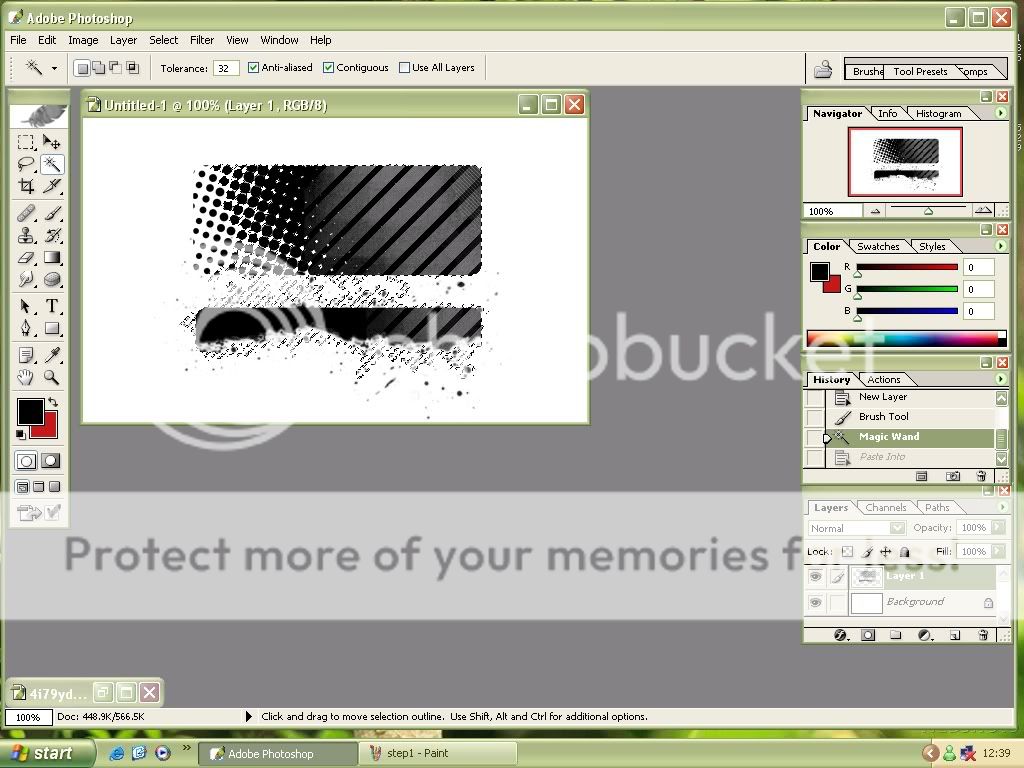
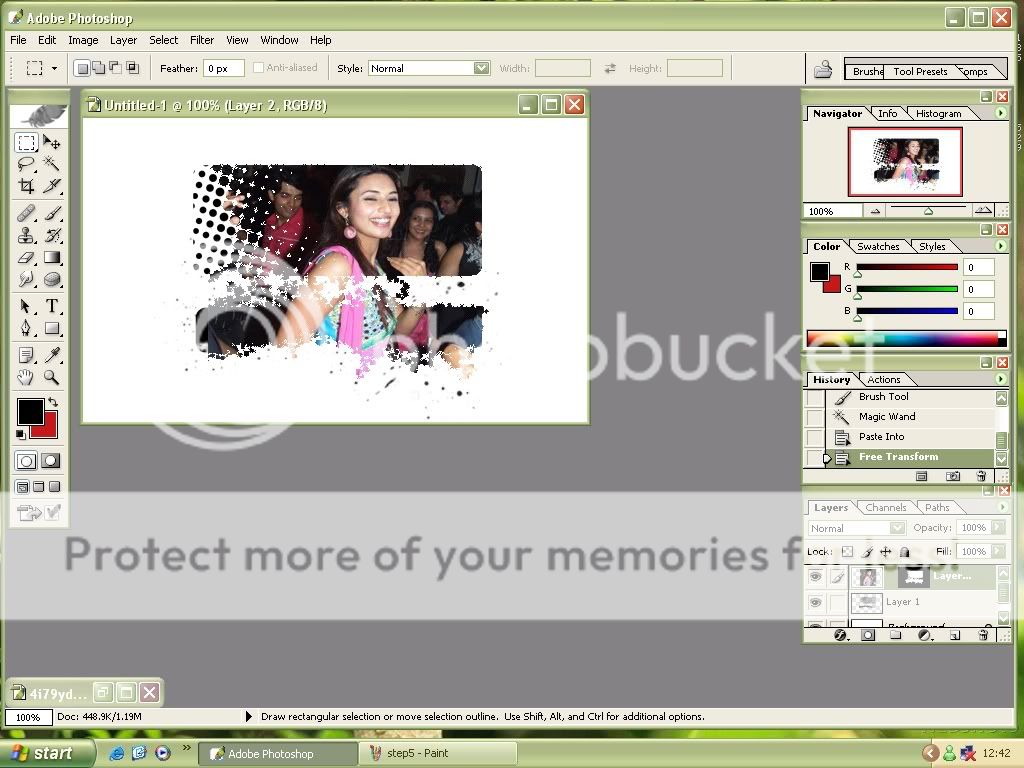
How to put a pic in a mask:
[Tutorial made by me]

1.Make a new layer


2.Apply the brush you want to use as a mask, click on the magic wand tool and click the mask.


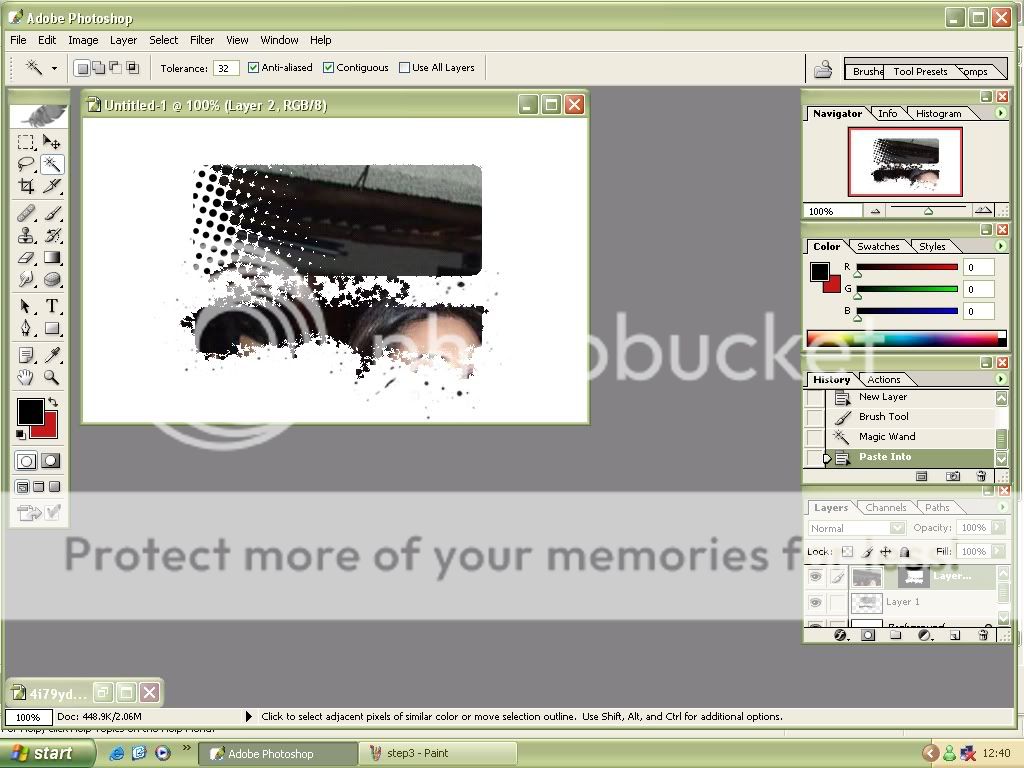
3.Paste the picture and deselect the mask (by clicking anywhere off the mask and pic).


4.You should get something like this:


5.Now you need to resize the pic (if its 2 big) - U can also move the pic around inside the mask


6.This is what it should look likenow:


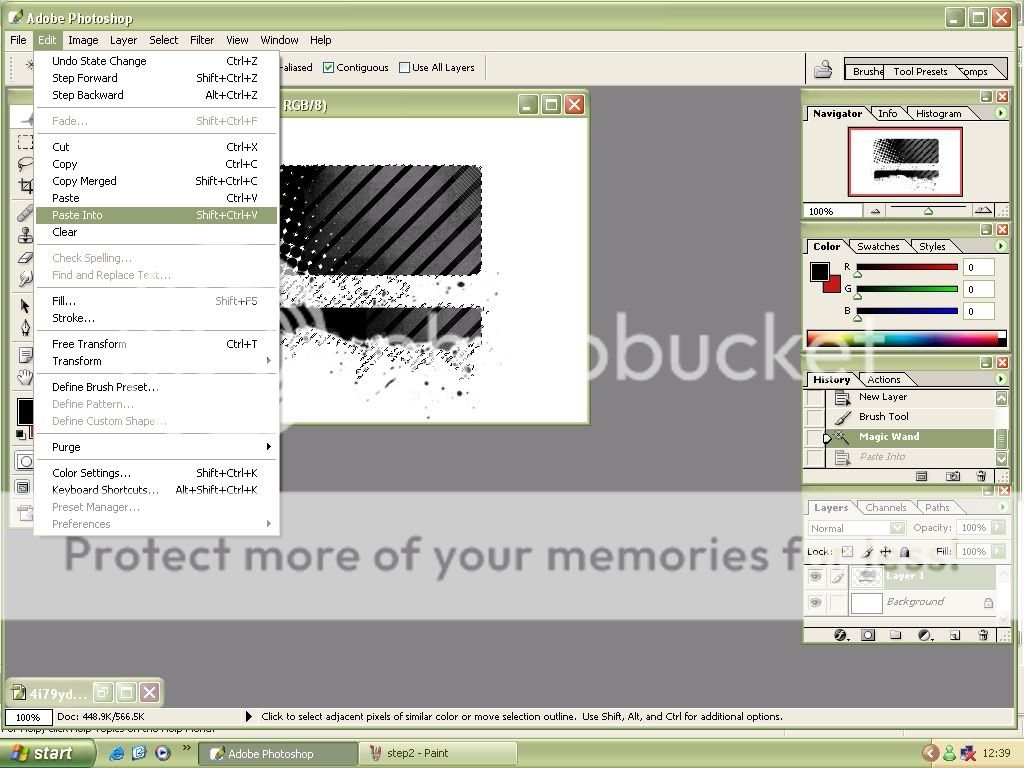
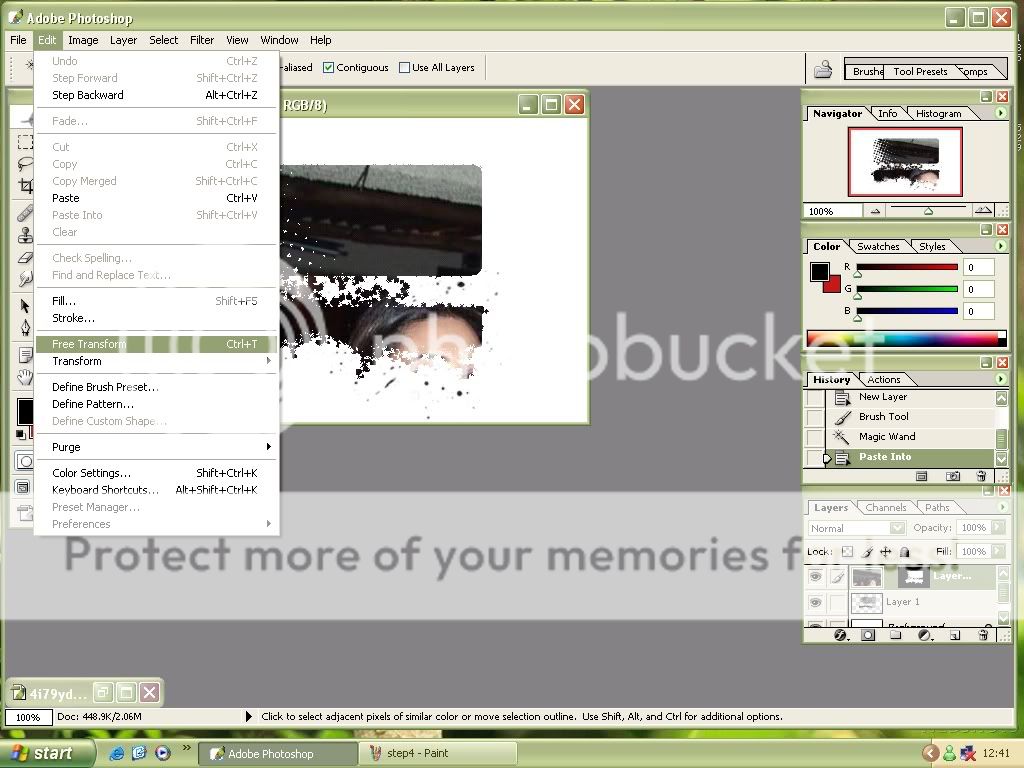
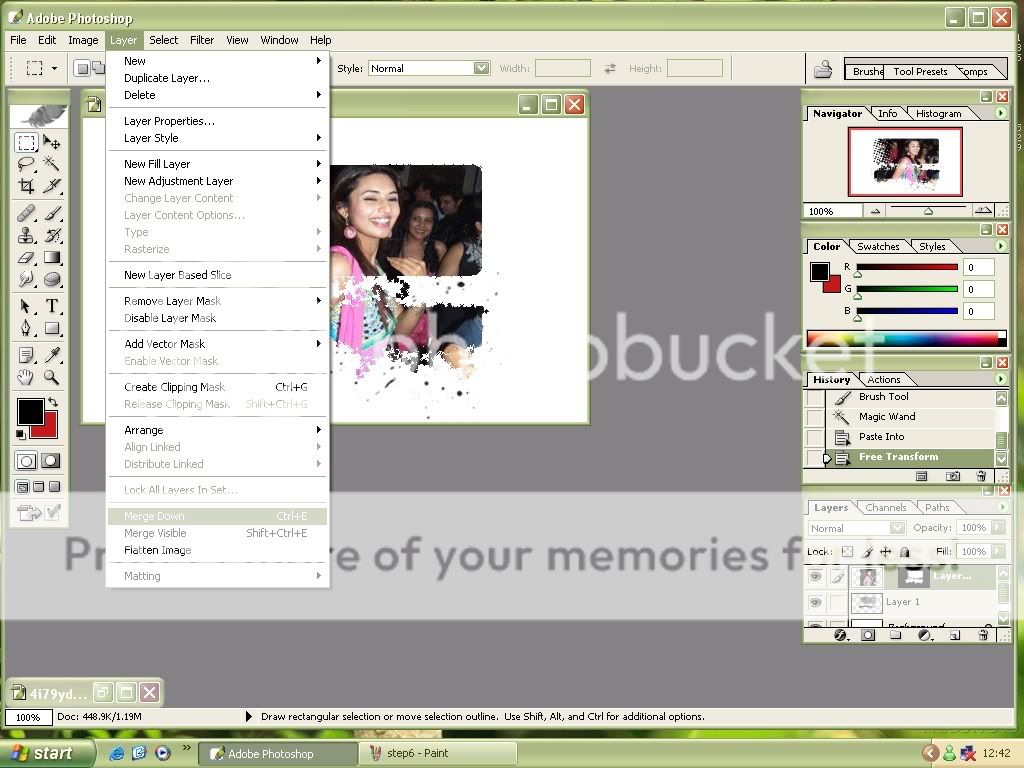
If you want to move the pic along with the mask this is what you have to do:


And then click Edit > Free Transform

Hope that helped.

tc

xx
Edited by Princess Dollie - 18 years ago
196045 thumbnail
Posted: 18 years ago
#23

Here am posting a tut abt rotating a brush.

First open ur photoshop n then click new.......select transparent option.

select the brush u want to rotate

now add the brush in the blank siggy n press ctrl+t

now rotate the brush n drag it to the siggy where u want to add it.

hope it helps

luv,

ghungroo😛

Shoma_ thumbnail
18th Anniversary Thumbnail Explorer Thumbnail
Posted: 18 years ago
#24

Here is a tutorial on how to put glowing effect on siggys for photoshop,i dont know whether this was already put up or not,neways,

step:1-open the pic,for the tutorial this is the pic that is to be used,

step:2-duplicate the image,

step:3-the layer which is duplicated is the one tht ur to work on now,go to effects then go to blur and gaussian blur,make the radius to 1.0.

step:4-now blend the layer which is blurred,to the option screen.

step:5-now duplicate the same layer once again and again blend it to the option overlay,now it will look somewat like this,

hope this helps,if u have ne question,feel free to pm.😊

desi21 thumbnail
19th Anniversary Thumbnail Dazzler Thumbnail + 2
Posted: 18 years ago
#25
how to blend 2pics together in psp hope u guys like this tut

Ill b using these 2 pics


u can copy n paste these two sigs into psp.

1. open a new document set the followin settings.

2. copy n paste the 2 pics on to tht document it will look like this

3. To blend the pics together.. take the eraser button
then start erasing like this...
4. erase it out makint he sigs blend in toghetr like this.

5. Merge all the pics together by...
6. at this point u have merged the sig togheer u can write watever u want to write on.

7. additional steps.
copy this pic n paste it over the blended sig like this
8. it will now look like this
dont wrrythe sig will b back :)
9. go to Layers ----> Properties u will get this back set ur settings like this

10. Now ur sig will look like this
11. to add text- once ur done addin the text jus to to Layers ---> merge ---> Merge visible
11. You can also add brushes...
12. Heres my final result

Dont forget to post ur final results. If you have ne questions u can ask me here or pm me :)
Edited by desi21 - 18 years ago
-Obsession- thumbnail
19th Anniversary Thumbnail Rocker Thumbnail + 2
Posted: 18 years ago
#26

Alot of People have asked me how to Outline your brushes. So I am posting a tut for it 😊

To outline brushes

* Create a New Ratser layer

*Stamp on ure Brush

* Edit --> Copy

* Open a new transparent Layer and fill it with the colour u want ure outline to be

* After u done that, Edit --> Paste as new Selection

* Selections --> Modify --> Expand --> And set the Number of pixels to 2

* Edit --> Copy

*Go to ure sig, Edit --> Paste as New layer

And your done!

If u dont get anything let me no 😉

And I'm sorry there are no screenshots 😳

blahblahblahbla thumbnail
20th Anniversary Thumbnail Voyager Thumbnail + 2
Posted: 18 years ago
#27
Tutori al on how to make a siggy with multiple effects
Start off by choosing a good quality photo. i'll use this kangan renaut photo:
http://www.kanganaranaut.com/gallery/displayimage.php?pid=10 05&fullsize=1
open up psp9
Okay, so then click on file-->new-->make the dimensions 500 by 300 w/ a white bakcground.
then, copy the picture and past as new image.
now follow these steps for the picture [not the blank white one of course]:
1. click on layers-->duplicate
2.click on adjust-->blur-->gaussian blur [make the radius 1.00]
3. click on layers-->properties--> blend mode-->screen and click ok
my picture looks like this: [hopefully ur does too!]

By the way, to get the picture to be this small, i did this:
i hit prtscrn [which is a button at the top of ur keyboard], then i opened up paint [not paint shop pro but the bitmap image one] and pasted it, then i cut that image and pasted it into psp 9 n now lets continue:
so take the image you just created and past it into the blank white thing. to do that, click on -->edit-->paste-->paste as new layer
it should look like this now and u can move it around with the move tool

Alright, now that you've got your image to look beautiful and you've gotten it into the correct size and into the document, time to add the COOL effects.
I'm going to start off adding a texture to the image.
This is the texture I will use:
http://swimchick.net/visitors/textures/texturex15.png
To use it, just save it somewhere where you can find it, and then import it into psp9.
once you've done that, copy the texture, and paste it over your kangana renaut image like so:
edit-->paste-->paste as new layer
then go to layers-->properties-->blend mode-->screen
click okay
now the picture should look something like this [use the move tool to adjust where the sparkley stuff is]:

okay, now, just save that image [before something goes wrong]. then, you can add some brushes and don't forget to add your signature..final product can be smething like this-->


its quite simple, but i was just helping out w/ the texture. you can experiment with it..instead of making the blend mode to screen, you can try the other ones and see what suits the image!
good luck n pm me if u'd like to request something!
*sweet-soni* thumbnail
19th Anniversary Thumbnail Voyager Thumbnail
Posted: 18 years ago
#28

How to download and extract brushes - for psp

01. Make a folder on your desktop (or another easily accessible area) called "Brushes" or "PSP Brushes." In this folder, you will download the brushes you want.

02. clikc on your brush it should take you to a screen and then somewere it should say download and click it and then a box will pop up. And click save. Then your desktop menu comes make a new file somewere so all your brushes will be there and then save it.

INSTALLING

03. Once the download is complete, double click on open. A screen will pop up. On the left side of the screen near the top, it says, "extract all files." Click to extract the files.

04. An Extraction Wizard box will pop up. Click next.

05. There is a white box with a directory link in it. Underneath the box is a button that says "Browse."

06. Click the browse button and another box pops up telling you to choose your location.

07. Click the little plus beside My Documents, and then click the little plus beside My PSP Files.

08. Click Brushes, and then click OK at the bottom of the box. The directory of the extraction has been changed to C:\Documents and Settings\Owner\My Documents\My PSP Files\Brushes. This is where your brushes will be located after they are extracted. Click next to extract them.

09. Your Extraction Wizard box should tell you that your extraction has been successful. Then click finish.

IMPORTING

12. Open your PSP9 program. Click File > Import > Custom Brushes.

11. A list of your brushes should appear in the left box. Click the ones you would like to import and then click the Add button in the middle. Or, if you would like to import all of your downloaded brushes at once, click Add All.

12. Once you have all the brushes you want selected for import, click OK at the bottom. Your brushes will now be imported into your PSP9 program.

13. Open a graphic or a blank page [File > New].

14. Click your Paint Brush Tool on the left [it looks like a little paint brush. If you do not have a tool bar at your left, go to View > Toolbars > Tools].

15. Then take your brush and were your color pattlet is (were you choose the colours) change the colour so that colour will be the colour of your brush. And then paste the brushe on the the blank page or graphic. And wallah your done!

IF your still stuck somewere. pm me! 😊
And this tut is from google, its not made by me. But somethings didn't make sense so i edited it.

Edited by *sweet-soni* - 18 years ago
Tessa_ox thumbnail
18th Anniversary Thumbnail Navigator Thumbnail
Posted: 18 years ago
#29

Cirl tut made my me!

tutorial made in psp8

open ur psp(ofcourse)
fil>open>open ur picture.

click on the square thing and go to selection.


then click on circle thingyy..


now click on the pic where u want ur clicle .


then go to EDIT>COPY>PASTE AS A NEW IMAGE,

after go to file>new>Pick a background color>okay.

now go to the circle pic.then Edit>copy

den go to the background image and click Edit>Paste>Paste as a new selection.

after go to selection>modify>Expand

and pick number of pixles den click okay.

now press CTRL+C on ur keyboad or go to EDIT>COPY

then go Edit>Paste>Paste as a new image.

here's da final result.

note;;if u still dont get it feel free to pm me!😊


Edited by 10zin13x - 18 years ago
IBserenity thumbnail
20th Anniversary Thumbnail Rocker Thumbnail + 3
Posted: 17 years ago
#30

List of Tutorials from Page 35 to 102. Tutorials from pages 1-35 are on the 1st of the Questions and Queries Section.

PLEASE READ THIS LIST BEFORE POSTING TUTORIALS! We do not need multiple tutorials showing the same thing. If you post a new tutorial, please send the link of the page to one of the mods so they can add it to the list. This way, it is easier to find tutorials and we do not lose them in the 100s of pages.

Thanks for all your hard work.

My Blinkii Text Tutz
https://www.india-forums.com/forum_posts.asp?TID=504625&T PN=39
Colorize a Pic in PSP
https://www.india-forums.com/forum_posts.asp?TID=504625&T PN=40
blending in psp
https://www.india-forums.com/forum_posts.asp?TID=504625&T PN=41
Adding 2 Video Avis together/adding borders
https://www.india-forums.com/forum_posts.asp?TID=504625&T PN=42
Scripts in PSPX
https://www.india-forums.com/forum_posts.asp?TID=504625&T PN=42
Outlining Brushes
https://www.india-forums.com/forum_posts.asp?TID=504625&T PN=46
How to make a simple Icon
https://www.india-forums.com/forum_posts.asp?TID=504625&T PN=46
Selective Coloring in Photoshop
https://www.freewebs.com/coolbies/tutorial004.html
https://www.freewebs.com/coolbies/tutorial005.html
Brighten in Photoshop
https://www.freewebs.com/coolbies/tutorial003.html
Download from youtube
https://www.india-forums.com/forum_posts.asp?TID=504625&T PN=48
Tutori al on how to make a siggy with multiple effects
https://www.india-forums.com/forum_posts.asp?TID=504625&T PN=50
How to add a copyright to your video avi
https://www.india-forums.com/forum_posts.asp?TID=504625&T PN=52
How to download and extract brushes - for psp
https://www.india-forums.com/forum_posts.asp?TID=504625&T PN=53
Brushes for psp:
paint shop pro brushes -
https://www.inxplicable.org/design/mybrushes.html
https://www.ftmagic.com/brushes.html
https://www.geocities.com/Heartland/Ranch/9969/brushes/brushe s.html
https://www.autumnweb.com/Roxys/Tubes/Brushes.html
https://search.deviantart.com/searchcraft/?section=browse& ;qh=boost%3Apopular+age_sigma%3A24h+age_scale%3A5&q=psp+ brushes&offset=48
Photoshop brushes -
https://search.deviantart.com/?section=browse&qh=boost%3A popular+age_sigma%3A24h+age_scale%3A5&q=photoshop+brushe s
https://www.misprintedtype.com/v3/goodies.php
https://www.itsuji.net/brushes/index.php?x=featsets.php
https://www.psbrush.com/
Great site for ps brushes -
. php
https://purplepopcorn.com/you/brushes.html

Another Circle Tut in PSP
https://www.india-forums.com/forum_posts.asp?TID=504625&T PN=55
TUTORIAL ON DOWNLAODING JBR.BRUSHES INTO PSP.
https://www.india-forums.com/forum_posts.asp?TID=504625&T PN=56
Using Image Packs
https://www.india-forums.com/forum_posts.asp?TID=504625&T PN=56
How to add borders to your creations in photoshop
https://www.india-forums.com/forum_posts.asp?TID=504625&T PN=57
Putting videos in siggies
https://www.india-forums.com/forum_posts.asp?TID=504625&T PN=57
https://www.india-forums.com/forum_posts.asp?TID=504625&T PN=82
Full Siggy Tut for PSP
https://www.india-forums.com/forum_posts.asp?TID=504625&T PN=58
How to use textures
https://www.india-forums.com/forum_posts.asp?TID=504625&T PN=59
How to make a layout for websites
https://www.india-forums.com/forum_posts.asp?TID=504625&T PN=60
How to blend 2 pics together!
https://www.india-forums.com/forum_posts.asp?TID=504625&T PN=61
Glow Your Text
https://www.india-forums.com/forum_posts.asp?TID=504625&T PN=62
Animated Text Gradient Photoshop
https://www.india-forums.com/forum_posts.asp?TID=504625&T PN=64
Creating a Funny Ghost Animation Photoshop
https://www.india-forums.com/forum_posts.asp?TID=504625&T PN=65
Add a glow to pic PSP
https://www.india-forums.com/forum_posts.asp?TID=504625&T PN=66
Stacking Video Avis
https://www.india-forums.com/forum_posts.asp?TID=504625&T PN=73
Adding Text on Video Avis
https://www.india-forums.com/forum_posts.asp?TID=504625&T PN=73
Photoshop Brush , into a Paint Shop Pro Brush
https://www.india-forums.com/forum_posts.asp?TID=504625&T PN=74
Tutorial for blending in photofiltre
https://www.india-forums.com/forum_posts.asp?TID=504625&T PN=76
TUTORIAL FOR PICTURE RE-TOUCH Photoshop
https://www.india-forums.com/forum_posts.asp?TID=504625&T PN=76
TUT FOR UPLOADING BRUSHES IN PSP 7
https://www.india-forums.com/forum_posts.asp?TID=504625&T PN=78
HOW TO UPLOAD BRUSHES IN PSP10/12 #1&2
https://www.india-forums.com/forum_posts.asp?TID=504625&T PN=78
How to get the link and add an avi and signature
https://www.india-forums.com/forum_posts.asp?TID=504625&T PN=85
Tutorial for Glowing Text
https://www.india-forums.com/forum_posts.asp?TID=504625&T PN=87
Video Siggy:
https://www.india-forums.com/forum_posts.asp?TID=504625&T PN=89
Soft dreamy effect
https://www.india-forums.com/forum_posts.asp?TID=504625&T PN=90
More Coloring Effects in Paint Shop Pro
https://www.india-forums.com/forum_posts.asp?TID=504625&T PN=90
Selective Coloring in Photoshop
https://www.india-forums.com/forum_posts.asp?TID=504625&T PN=92
Coloring Tutorial for Photoshop and Paint Shop Pro
https://www.india-forums.com/forum_posts.asp?TID=504625&T PN=93
Image filled text
https://www.india-forums.com/forum_posts.asp?TID=504625&T PN=94
Another Coloring Effect Tutorial for Photoshop and Paint Shop Pro
https://www.india-forums.com/forum_posts.asp?TID=504625&T PN=95
Custom Brushes in PSP
https://www.india-forums.com/forum_posts.asp?TID=504625&T PN=95
Coloring Effects in PSP/PS
https://www.india-forums.com/forum_posts.asp?TID=504625&T PN=96
https://www.india-forums.com/forum_posts.asp?TID=504625&T PN=97
https://www.india-forums.com/forum_posts.asp?TID=504625&T PN=99
Erase Bkgrd in PSP
https://www.india-forums.com/forum_posts.asp?TID=504625&T PN=100

Related Topics

Avatar and Signatures Shop thumbnail

Posted by: .StarryPhoenix · 10 years ago

This is a thread where you all can share everything anything, be it be a Tutorial, PSD, Suggestions, Textures, Animations, etc Try and avoid too...

Expand ▼
Top

Stay Connected with IndiaForums!

Be the first to know about the latest news, updates, and exclusive content.

Add to Home Screen!

Install this web app on your iPhone for the best experience. It's easy, just tap and then "Add to Home Screen".