Questions & Queries Corner 2011 - Page 95

Created

Last reply

Replies

1.1k

Views

107.9k

Users

223

Likes

608

Frequent Posters

ruky786 thumbnail
19th Anniversary Thumbnail Trailblazer Thumbnail + 4
Posted: 14 years ago
Here it is:

LOL im still learning so obviously the quality isnt that great but i'll get it better!😆


Thank you so much though your tutorial really really helped!😃😃😃🤗
Edited by ruky786 - 14 years ago
..oneOone.. thumbnail
19th Anniversary Thumbnail Sparkler Thumbnail + 6
Posted: 14 years ago

Originally posted by: -KaJenAbhiya-

Oh, okay. Yeah, sure! Please do make a tut for me. I understand a little about the Selective Colorings, but there are a few things I just don't understand how to do. Like the 2nd one, I have no clue how that coloring effect was added. Yes, I have Photoshop. :)



hey again
my siggys outlook is like this...


from this


do u still want the tut for it??? i mean is this kind of effect is accepted...its not actually like that but nearly it is

ana

..oneOone.. thumbnail
19th Anniversary Thumbnail Sparkler Thumbnail + 6
Posted: 14 years ago

Originally posted by: ruky786

Here it is:

LOL im still learning so obviously the quality isnt that great but i'll get it better!😆


Thank you so much though your tutorial really really helped!🤗


i know u will get how to improve quality soon...its not that difficult
siggy come out great but to apply animation to a siggy, you can use a much easier way
their is a tut by Sri which is really helpful to use animation in a still siggy

http://india-forums.com/forum_posts.asp?TID=1611090&PID=42292761&#42292761

tc...
ana

Medha. thumbnail
15th Anniversary Thumbnail Sparkler Thumbnail + 4
Posted: 14 years ago

Originally posted by: cool_SK


hey again
my siggys outlook is like this...


from this


do u still want the tut for it??? i mean is this kind of effect is accepted...its not actually like that but nearly it is

ana

OMG! Yes! Please do tell me what you did there! :)
_mahi_ thumbnail
18th Anniversary Thumbnail Rocker Thumbnail + 6
Posted: 14 years ago
Hey
I have some problems regarding my signature upload.. do i post them here as it says in the title or should i do something else?😊
..oneOone.. thumbnail
19th Anniversary Thumbnail Sparkler Thumbnail + 6
Posted: 14 years ago
here is the psd link for the image i send before
http://www.2shared.com/file/z6hD68qo/kajolsrk.html


Easy brownish coloring tutorial
by ana
(cool_SK)


1. Open the pic you need to make image of
i choose the classic pic of SRK-Kajol


2. I just add a lil border and duplicate the layer to make a radial blur effect to make it look dreamy
to add radial blur effect
Filter>Blur>Radial Blur
Blur Method>Spin
Quality>Good
Amount>50
how can use any amount how much radial you want it

then just take the erase tool and low the opacity of the layer so you can easily erase the part of the faces and body of the characters making the background look dreamy

ok after i m done with this it looks like this


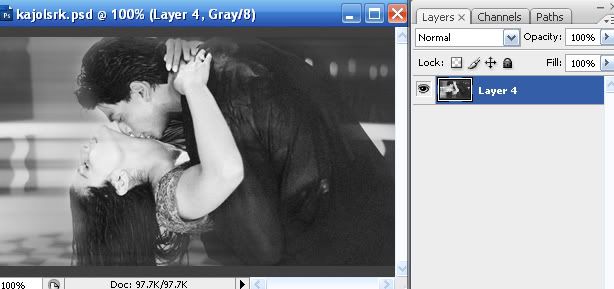
3. Now you need to convert the mode
Go to Image>Mode>Greyscale

there will be a pop-up asking if you want to merge
Merge it and then it will ask you to use black & white but Discard it
So now my image is like this


4.Now again you have to go to
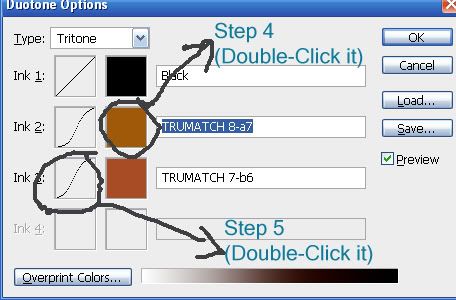
Image>Mode>Duotone

Type:Duotone or tritone whatever you want
it depends upon how many colors you want in your siggy

I am choosing Tritone

Ink1: Black
For Ink2 & Ink3 : Double-Click the white color box


[Book: Select Trumatch...thats the last option]

select any color you want, but as i am trying to have a brownish kind of color i am using
TRUMATCH 8-a7 & TRUMATCH 7-b6

(you can also copy this and paste it in the written box after to get this color direct without getting into book)

So all in all my colors are

Ink1: Black
Ink2 : TRUMATCH 8-a7
Ink3: TRUMATCH 7-b6

5. Click on the Curves option beside color
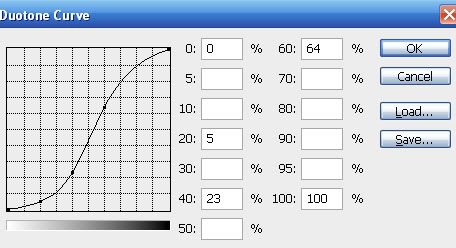
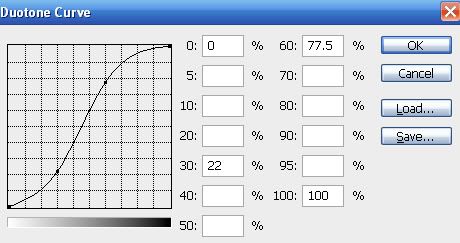
and give a lil curve to give the image a deep and glow color

I am using this setting for Ink2 color


and this setting for Ink3


So my image is like this now


6. add textures or text you want to

7. In the end the problem is you wouldnt be able to save it as jpeg or gif or even png
coz the mode scale dont allow us that

Go to Image>mode>select RGB color

So over all my siggy is like this
just for this tut i made it simple


Note: to all a lil coloring other than brown
then do this step-7 after step-5
so mine turned out like this


{the pic i send before was a way too much hard, this one is simple}

do tell me if it helped or not

take care
luv ya
ana

Edited by cool_SK - 14 years ago
Riasa thumbnail
15th Anniversary Thumbnail Rocker Thumbnail + 4
Posted: 14 years ago
i want to know does anybody take VM req. ... if yes plzz pm mee ...i want one vm ...
..oneOone.. thumbnail
19th Anniversary Thumbnail Sparkler Thumbnail + 6
Posted: 14 years ago

Originally posted by: Riasa

i want to know does anybody take VM req. ... if yes plzz pm mee ...i want one vm ...


you should ask this in place for request thread...
normaly i dont see that


pree4ru thumbnail
18th Anniversary Thumbnail Stunner Thumbnail + 4
Posted: 14 years ago

Originally posted by: Riasa

i want to know does anybody take VM req. ... if yes plzz pm mee ...i want one vm ...


u hv seperate gallery for VM here it is
VideoMix
AlexithyMia thumbnail
16th Anniversary Thumbnail Dazzler Thumbnail + 3
Posted: 14 years ago
I have some pix of any actor. I wanna put the 2 pix together. How do I do that?

For example m usin my own signature :


In the 1st pic, so many pix are put together here n thr r no edges. I think thats called Assembling.
Anyone please tell me how to do it on Photofiltre or Photoscape 😳
Edited by Ramya-KaShian - 14 years ago

Related Topics

Avatar and Signatures Shop thumbnail

Posted by: Lianaa · 7 years ago

Hey friends Welcome to Questions Queries Corner Please post all your questions queries here instead of making new topics. If any "help" topics...

Expand ▼
Avatar and Signatures Shop thumbnail

Posted by: RudrakshPreesha · 8 years ago

Anim a t e d N o nAn i m a t e dR e qu e sts Wanna get your request done without waiting for too long? Well then this is the place to place your

Expand ▼
Top

Stay Connected with IndiaForums!

Be the first to know about the latest news, updates, and exclusive content.

Add to Home Screen!

Install this web app on your iPhone for the best experience. It's easy, just tap and then "Add to Home Screen".