


Lets Discuss New Site Issues Here 😇 - Page 28

Created

Last reply

Replies

1.5k

Views

146.3k

Users

204

Likes

1.5k

Frequent Posters

Free_Rein thumbnail
9th Anniversary Thumbnail Rocker Thumbnail
Posted: 6 years ago

Originally posted by: vijay

Well in normal case it should not be like that. As on my computer its showing correct.

Can you share the link it will help in debugging.

And yes it is coming in Quote we will fix that soon just waiting for peak hours to get over.


I just edited my post. So it should show when I edited this post. If it shows 4-5 months ago let me know.

vijay5/10/2019 6:00:55 PM

Yes it is shown as "Edited by Vijay in 5 months" see the screenshot:

________________________________________________

Image

________________________________________________

Edited by ...Nihara... - 6 years ago
Posted: 6 years ago

Originally posted by: ...Nihara...

Yes it is shown as "Edited by Vijay in 5 months" see the screenshot:

________________________________________________

Image

Thank you.

Understood the issue. Its due to difference in Indian date style (DD/MM/YYYY) and US date style(MM/DD/YYYY).

We will fix this issue soon.

....

Edited by vijay - 6 years ago
Leenaaa thumbnail
Posted: 6 years ago

Originally posted by: vijay

Thank you.

Understood the issue. Its due to difference in Indian date style (DD/MM/YYYY) and US date style(MM/DD/YYYY).

We will fix this issue soon.

Change the date style too in joined date in hover card of the user

As am not used to US date style and think it's the DD instead of MM

So confusing sir😕

Leenaaa thumbnail
Posted: 6 years ago

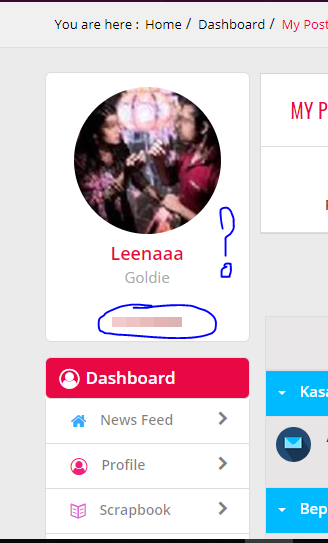
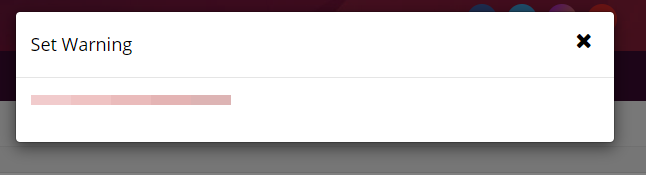
ok I just found this.What issss thiss??

and when I click on this gradient color thingy, it displays 'Set warning'

What?

Image

Image

*Dev.* thumbnail
13th Anniversary Thumbnail Stunner Thumbnail + 5
Posted: 6 years ago

@Vijay Bro,

When I visited one of my friends profile, I couldn't find PM option anywhere. How am I supposed to message her then? Earlier we used to have two options, one was of PM when we used to visit someone's profile. Actually, not everyone reads scrapbook, hence PMs become more important. Kindly make that option available again at profile.


Also, Earlier we used to have recent posts which we don't have now. It used to reflect right side which used to tell our recent posts and also if someone commented on it. We need that back.


Also, I can't find my dashboard. From phone, and whenever I click on dashboard from options, it starts showing some articles. 🙄😌


Regards Dev.

Edited by *Dev.* - 6 years ago
Saru... thumbnail
18th Anniversary Thumbnail Sparkler Thumbnail + 3
Posted: 6 years ago

Y am i unable to send pm to non frnds. I typed their name but its not showing.kindly help

Free_Rein thumbnail
9th Anniversary Thumbnail Rocker Thumbnail
Posted: 6 years ago

Okay guys few days back i said that Android phone users can directly copy paste pics/gifs from AT and Twitter without using image hosting site...I just discovered that we can also copy paste "insta posts" too without using image hosting site...i mean you can copy paste pic/caption/pic along with caption from insta posts directly without using image hosting site.....

First go to an insta post,then click 3 vertical dots on the top right corner...then click "copy link".. Then paste it in search bar of "chrome" or any other browser..then that insta post appears in the browser/chrome...press the screen on random lines of insta post...then two blue color lines appear..adjust the pic in between two lines or click "select all" then directly paste it in Editor box of IF....Whatever you copied will appear in the Editor box.. You can delete other text keeping only the pic if you want to post only a pic in the post...

I wanted to share this trick as someone here asked me few days back that "other than from ATs and twitter, from where can we copy paste pics directly without using image hosting site in Android phone.".. So thought of sharing this here as i couldn't find "Tutorial thread" to post it lol

Posted: 6 years ago

Originally posted by: ...Nihara...

Okay guys few days back i said that Android phone users can directly copy paste pics/gifs from AT and Twitter without using image hosting site...I just discovered that we can also copy paste "insta posts" too without using image hosting site...i mean you can copy paste pic/caption/pic along with caption from insta posts directly without using image hosting site.....

First go to an insta post,then click 3 vertical dots on the top right corner...then click "copy link".. Then paste it in search bar of "chrome" or any other browser..then that insta post appears in the browser/chrome...press the screen on random lines of insta post...then two blue color lines appear..adjust the pic in between two lines or click "select all" then directly paste it in Editor box of IF....Whatever you copied will appear in the Editor box.. You can delete other text keeping only the pic if you want to post only a pic in the post...

I wanted to share this trick as someone here asked me few days back that "other than from ATs and twitter, from where can we copy paste pics directly without using image hosting site in Android phone.".. So thought of sharing this here as i couldn't find "Tutorial thread" to post it lol

We would highly suggest not to copy / paste images directly from Instagram or other social media sites as after some time it will not show as they will block Hotlinking unless its done properly. We are currently working on a way by which you can easily embed the whole instagram post by just pasting the link and it will embed the entire post.

Instagram / Facebook / Twitter / Youtube

We are going to support these at the moment.

Posted: 6 years ago

Originally posted by: *Dev.*

@Vijay Bro,

When I visited one of my friends profile, I couldn't find PM option anywhere. How am I supposed to message her then? Earlier we used to have two options, one was of PM when we used to visit someone's profile. Actually, not everyone reads scrapbook, hence PMs become more important. Kindly make that option available again at profile.


Also, Earlier we used to have recent posts which we don't have now. It used to reflect right side which used to tell our recent posts and also if someone commented on it. We need that back.


Also, I can't find my dashboard. From phone, and whenever I click on dashboard from options, it starts showing some articles. 🙄😌


Regards Dev.

Message option will be added to the Profile

Recent Posts we will check if we can add that to the post or accommodate that somewhere else. We will also be tweaking the Notifications so that you do get notified whenever someone quotes your post or have tagged your username (will come later).

I think you are referring to Profile. We will be making changes on that page and will try getting user feedback before doing that.

Posted: 6 years ago

Originally posted by: Saru...

Y am i unable to send pm to non frnds. I typed their name but its not showing.kindly help

Currently the autocomplete just takes friends in your buddy list as loading millions of users not possible.

You need to find their post and click the Message option in the hover card. We are working on ways to make it easier to find user profiles.

Btw also do let me know if the Edited text below coming fine?

Edited by vijay - 6 years ago

Related Topics

Suggestions / Comments thumbnail

Posted by: vijay · 1 years ago

Hi All, First off, a huge thank you to each one of you! Your active participation and enthusiasm continue to shape our community into a vibrant...

Expand ▼
Suggestions / Comments thumbnail

Posted by: Jayshree · 2 years ago

Hi guys, This topic is for "New Show/Forum" requests. Just post the Show/Forum you want to be opened here on I-F. We will consider whether it...

Expand ▼
Suggestions / Comments thumbnail

Posted by: vijay · 2 months ago

Hello Everyone, We’ve just added 3 exciting new quizzes for you to try out: ✨ Which Element Defines You: Fire, Earth, Air, or Water?...

Expand ▼
Top

Stay Connected with IndiaForums!

Be the first to know about the latest news, updates, and exclusive content.

Add to Home Screen!

Install this web app on your iPhone for the best experience. It's easy, just tap and then "Add to Home Screen".