

Hrithik Roshan took 4 Hours each day for Krrish 3 Make Up!
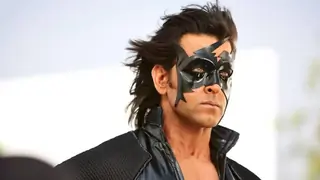
Hrithik Roshan, who plays 2 characters in his upcoming film Krrish 3 took 4 hours for his make up on the film set.
Published: Wednesday,Aug 07, 2013 14:31 PM GMT-06:00

 The trailer of Krrish 3 has taken tinsel town by a storm and
in this 3rd installment of the biggest sci-fi film of Bollywood, both
Krrish and his father Rohit would be seen in the film. Hrithik Roshan who plays
both the characters revealed that it took him 4 hours on the set to go from one
character to the other.
The trailer of Krrish 3 has taken tinsel town by a storm and
in this 3rd installment of the biggest sci-fi film of Bollywood, both
Krrish and his father Rohit would be seen in the film. Hrithik Roshan who plays
both the characters revealed that it took him 4 hours on the set to go from one
character to the other.
"We had to do it. Rohit's character is a child at heart and he is always looking for happiness. But he also happens to be a Father in this film. Yes it was very difficult, And i can go on and on about how difficult it had been. But all our hard-work if not appreciated, Would be of no use. It's only worth, If it's been liked by everyone. And i am happy that my looks are being appreciated" revealed Hrithik Roshan.
After looking at the trailer many people have been asking about the involvement of Hollywood technicians on the film and to answer everyone Hrithik said, "My dad (Rakesh Roshan) made sure that no Hollywood Technicians must be hired for Krrish 3 and all the animations and graphic works were done here in India by our Indian Technician team. My dad always encouraged and motivated our technician that we can do it."
Krrish 3 will hit the screens on November 4th 2013 and stars Hrithik Roshan and Priyanka Chopra in lead roles.
Join Our WhatsApp Channel
Stay updated with the latest news, gossip, and hot discussions. Be a part of our WhatsApp family now!
Join NowYour reaction
 Nice
Nice Great
Great Loved
Loved LOL
LOL OMG
OMG Cry
Cry Fail
Fail













5 Comments