


::A/S Shop:: Questions & Queries Corner #8 - Page 39

Created

Last reply

Replies

386

Views

70.3k

Users

76

Likes

171

Frequent Posters

Leenaaa thumbnail

GIF Geniuses

Posted: 23 days ago

Originally posted by: priya185

Hi

I tried to save a video on Adobe Premiere Pro it says Adobe Media Encoder is not installed. Please download and install to use this feature. I need the 2022 version.

Hey, I have this media encoder version installed on my device. Download it and let me know.

priya185 thumbnail

Banner Baron

Posted: 19 days ago

Originally posted by: Leenaaa

Hey, I have this media encoder version installed on my device. Download it and let me know.

Hi, thank you for the prompt reply. I downloaded it

The same message shows when exporting the video on premiere pro. After downloading it is there another way to install it usually there is an exe file ?

Edited by priya185 - 19 days ago
Leenaaa thumbnail

GIF Geniuses

Posted: 18 days ago

Originally posted by: priya185

Hi, thank you for the prompt reply. I downloaded it

The same message shows when exporting the video on premiere pro. After downloading it is there another way to install it usually there is an exe file ?

Okay. It means that your device couldn't detect that the media encoder was installed because there was no setup file.

Try this one then Adobe Media Encoder 2022

priya185 thumbnail

Banner Baron

Posted: 16 days ago

Originally posted by: Leenaaa

Okay. It means that your device couldn't detect that the media encoder was installed because there was no setup file.

Try this one then Adobe Media Encoder 2022

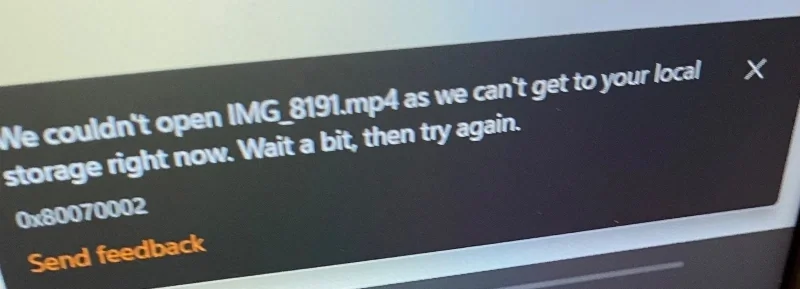
Hi The file saved but I can’t open it

I am getting this message now

86DE661D-5363-4A42-9CEA-A28364FC208D.jpeg

Edited by priya185 - 16 days ago
Leenaaa thumbnail

GIF Geniuses

Posted: 14 days ago

Originally posted by: priya185

Hi The file saved but I can’t open it

I am getting this message now

86DE661D-5363-4A42-9CEA-A28364FC208D.jpeg

Hey, Premiere Pro's export settings are quite complex, so, I am guessing this is the culprit for your corrupted video file. This used happen a lot when I used to play around with the settings.

Follow this export settings

https://www.youtube.com/watch?v=DHSw4yghUZs

If the problem still presists, try changing your file location.

Edited by Leenaaa - 14 days ago
priya185 thumbnail

Banner Baron

Posted: a day ago

Originally posted by: Leenaaa

Hey, Premiere Pro's export settings are quite complex, so, I am guessing this is the culprit for your corrupted video file. This used happen a lot when I used to play around with the settings.

Follow this export settings

https://www.youtube.com/watch?v=DHSw4yghUZs

If the problem still presists, try changing your file location.

Thank you it worked a few days ago.

Is yours still working now?

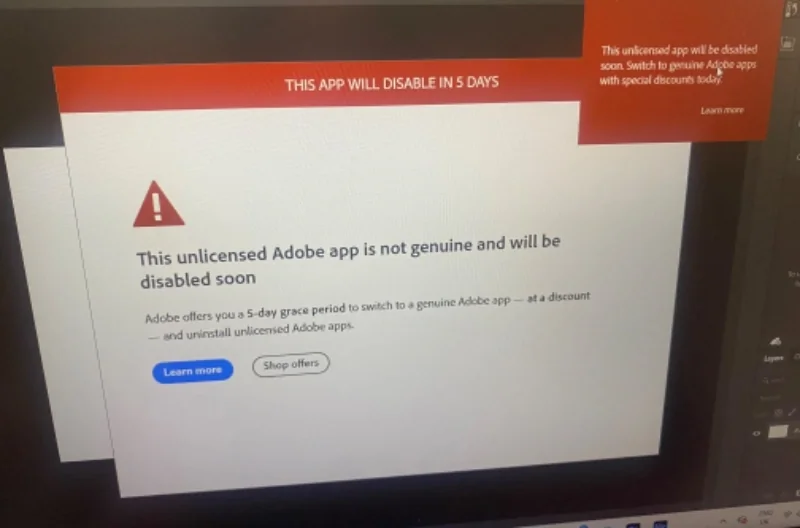
I get this message From Adobe for Photoshopsmiley39

AFDE3F96-E311-49C4-92E2-C45C147D5B46.jpeg
I tried common solutions like creating Inbound/ Outbound rules however it did not work for me and AGS doesn’t show for me.

Edited by priya185 - 19 hours ago
Leenaaa thumbnail

GIF Geniuses

Posted: 18 hours ago

Originally posted by: priya185

Thank you it worked a few days ago.

Is yours still working now?

I get this message From Adobe for Photoshopsmiley39

AFDE3F96-E311-49C4-92E2-C45C147D5B46.jpeg
I tried common solutions like creating Inbound/ Outbound rules however it did not work for me and AGS doesn’t show for me.

Download this file WinMasterBlocker <This is a batch script for Windows that is created to handle Windows Firewall rules and follow those steps

  1. Right click on the file and click on "Run as Administrator".
  2. A Windows Command prompt appears (a black screen).
  3. Hit the number 0 on your keyboard ( 0 for Adobe ), and press enter.
  4. Let it load and it will block all the files manually. It will take about 15 minutes or so (it can be quite slow or at least it was for me)
  5. It will state 'Completed blocking for Adobe' when complete, then press any key to end the process.
  6. Restart Photoshop.

So what this basically does is it permanently blocks network access to all adobe products.

Related Topics

Avatar and Signatures Shop thumbnail

Posted by: Quantum-Dot · 16 days ago

Hello everyone, Welcome to Avatar Signatures Shop Forum Banner Contest Voting round . Before you jump in, please do read the rules. ❤️ Y ou can...

Expand ▼
Avatar and Signatures Shop thumbnail

Posted by: Quantum-Dot · 1 months ago

Hello folks! Welcome to another brand new Avatar Signatures Shop Forum Banner Contest 2026. Before you jump in, please do read the rules. 💛...

Expand ▼
Avatar and Signatures Shop thumbnail

Posted by: Lianaa · 7 years ago

This thread is "Creations Exhibition #5 " where you can show off your latest work. And it is for everyone including members who have a...

Expand ▼
Avatar and Signatures Shop thumbnail

Posted by: Leenaaa · 6 years ago

Welcome to A/S CC #2! A place to discuss graphics making, life, muse (or the lack of it) and any random topic. Also anyone can request a critic...

Expand ▼
Avatar and Signatures Shop thumbnail

Posted by: .StarryPhoenix · 11 years ago

This is a thread where you all can share everything anything, be it be a Tutorial, PSD, Suggestions, Textures, Animations, etc Try and avoid too...

Expand ▼
Top

Stay Connected with IndiaForums!

Be the first to know about the latest news, updates, and exclusive content.

Add to Home Screen!

Install this web app on your iPhone for the best experience. It's easy, just tap and then "Add to Home Screen".