** ~Cool Creations~ AviSiggy Club** Note/Page-10 - Page 5

Created

Last reply

Replies

75

Views

8.4k

Users

19

Likes

109

Frequent Posters

..oneOone.. thumbnail
19th Anniversary Thumbnail Sparkler Thumbnail + 6
Posted: 12 years ago
#41

Originally posted by: ttrocks

Ana... Love U!! Cant tell U how happy I am to see U having opened ur own CC!! 👏 Congrats dearie!! 🥳


luv u too tapu...
this is for all of u...so i can too get to see so many amazing creations around on my fav forums :)
..oneOone.. thumbnail
19th Anniversary Thumbnail Sparkler Thumbnail + 6
Posted: 12 years ago
#42

Originally posted by: deepa17

Lovely Ana

I really want to learn...

Please pm me .. Whenever you will post ok..

Also new OS please post Ashni version na??? Pretty please


thank u deepa...
i hope u will learn alot...
hmmm...the story was not according to ashni so i skipped this time...
..oneOone.. thumbnail
19th Anniversary Thumbnail Sparkler Thumbnail + 6
Posted: 12 years ago
#43

Originally posted by: ..Gunjan..

Uh..can i join ? 😳
Though i know the basics of siggie and gif making i really have a lot more to learn and hope u could help me with it
Btw thanks for opening this CC :)


surly u can join...
n may b we could also get to learn from u too :)
..oneOone.. thumbnail
19th Anniversary Thumbnail Sparkler Thumbnail + 6
Posted: 12 years ago
#44

Originally posted by: ttrocks


Count ME in... always... for ur stupendous creations Ana!! 🤗


🤗back tapu...thank u for encouragement :)
..oneOone.. thumbnail
19th Anniversary Thumbnail Sparkler Thumbnail + 6
Posted: 12 years ago
#45

Originally posted by: Ru_21

Congrast for Opeing this CC n Thanks for LInks


thanks dear...😃
..oneOone.. thumbnail
19th Anniversary Thumbnail Sparkler Thumbnail + 6
Posted: 12 years ago
#46

Originally posted by: ara_000

ammu 🤗

i wanna learn to use PS.. merese woh hota na hai 😭


aww aru..
so good to see u here
ho jaye ga abh...dont worry...😳
..oneOone.. thumbnail
19th Anniversary Thumbnail Sparkler Thumbnail + 6
Posted: 12 years ago
#47

Originally posted by: hkp11

Beautiful of you to show folks how to create siggies Ana!!! 👏👏👏 🤗 😉

Your creations are awesome!! 👏👏👏 Congratulations on this new CC thread!! 😉


thank u so much hina...
i wanted to open it from so long but couldn't do it cause of something...
but now opened n hope it will b helpful😃
..oneOone.. thumbnail
19th Anniversary Thumbnail Sparkler Thumbnail + 6
Posted: 12 years ago
#48

Originally posted by: deepa17

I am not able to download ..Photoshop .. Antivirus is preventing it says malicious spyware..😭


awww...deepa..
i always use this link for my photoshop...

ok see this video and download it from here
https://www.youtube.com/watch?v=YUQ821b7ik0

..oneOone.. thumbnail
19th Anniversary Thumbnail Sparkler Thumbnail + 6
Posted: 12 years ago
#49


thank u dear :)
..oneOone.. thumbnail
19th Anniversary Thumbnail Sparkler Thumbnail + 6
Posted: 12 years ago
#50


Pictures used:

Image 1: https://i.imgur.com/DlyzhVO.jpg
Image 2: https://i.imgur.com/fresLM5.jpg


1:
Go to File > New
Choose the width and height of your desired signature. I mostly make 500*400.

2: Open the desired pictures by going to File> Open> select the picture from the folder and click open

3: Go to Image 1. Make sure your MOVE TOOL is active. Left click on the picture and hold it while you drag the picture to your New File and leave it.
4: Do the same procedure with the 2nd Image.

5: Arrange the pictures as you want it. You can see that I tilted the image 1 a little over image 2.

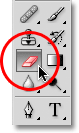
6: After you are done with it, Choose the Eraser Tool and select its size. For good blending, Its necessary to choose big size eraser. I used 135 size.

7: Make sure that the image from which you want to remove an extra part is placed above in layers(check lower right side corner for layer's tab).

8: Remove the extra part of the Image 2 till you are satisfied.

(Extra Point:
You can fill the background the way I showed in the video.)

9: My Image turned out to be like this
...

You can see that there are still some dim white parts in Image 2 are visible...But don't care. After the coloring everything will be alright.

Check My Final Image after coloring & writing.


(I am sorry If i am unable to make you understand few things but this video will help you...)

[YOUTUBE]http://www.youtube.com/watch?v=yX4TymDBXcg[/YOUTUBE]
thanx to hkp11 aka hina for helping out with video :)

NOW work on this tutorial and show me ur outcome before I will explain about coloring in my next tutorial...

Tools Name of PS CS3


Edited by ..oneOone.. - 12 years ago

Related Topics

Top

Stay Connected with IndiaForums!

Be the first to know about the latest news, updates, and exclusive content.

Add to Home Screen!

Install this web app on your iPhone for the best experience. It's easy, just tap and then "Add to Home Screen".