
Wikipedia Describes Dhurandhar The Revenge As A Propaganda Film
Netizens Upset With Deepika Padukone Singh
People waking up to Ranveer's peak male beauty!!!

COME & MEET ME 24.3
Filmfare Magazine Has South Stars On Cover

🏏 Chase Your Dreams… Predict IPL Winner & Win Big! 🏆
Armaan Malik And Payal Welcome Fourth Child
65 CRORES 1ST MONDAY FOR DHURANDHAR 2!!!!!!!
Men are literally going out to buy Ranveer's outfit from D2

Tuhir FF: Kuch Kuch Hota Hain Phirse Continued
Originally posted by: fatma201
Here is the procedure how to upload pic on the forum indirectly, i.e., from a photo hosting site to India-Forums.
1. Create a photo hosting account at a free photo hosting site like https://photobucket.com/ https://photobucket.com/
2. Login to the site using ur password and username.
3. Now upload pics from ur PC to the photo hosting site.
For eg: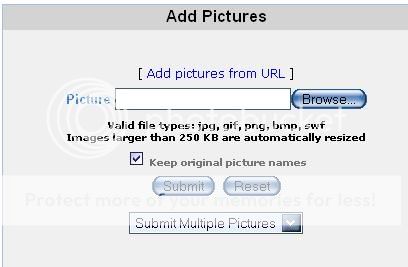
4. Click on Browse,then find out where ur file is and click Submit as shown above.
5. Ok now after the photo upload you can find a column down where the details of photo are mentioned.
For eg: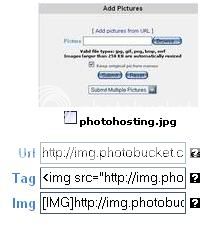
6. Ok now to paste that photo onto the forum click on the img column of that box and copy the img link given.
7. Then Paste the Link while Post/Replying a Topic.
8. Only paste the Img Link of the photo you want to upload.
For eg:
Suppose I want to paste my Indian-Idol Banner, I will paste the linkand my Banner will appear as:

I hope the above article was Informative and helps you.




There were 2 JA compilation videos of 9 min and 12 min released i guess during the first year by zee on their YouTube channel.Now while i search...











 Health and Fitness
 Cricket


19