

Pavitra Punia gets diamonds studded in her teeth for SAB’s Baalveer Returns!
Pavitra avers, " To enhance my character of Timnasa even more, and to add to the grandeur of the show, I also got diamonds embedded in my teeth specially."
Published: Monday,Aug 19, 2019 06:31 AM GMT-06:00

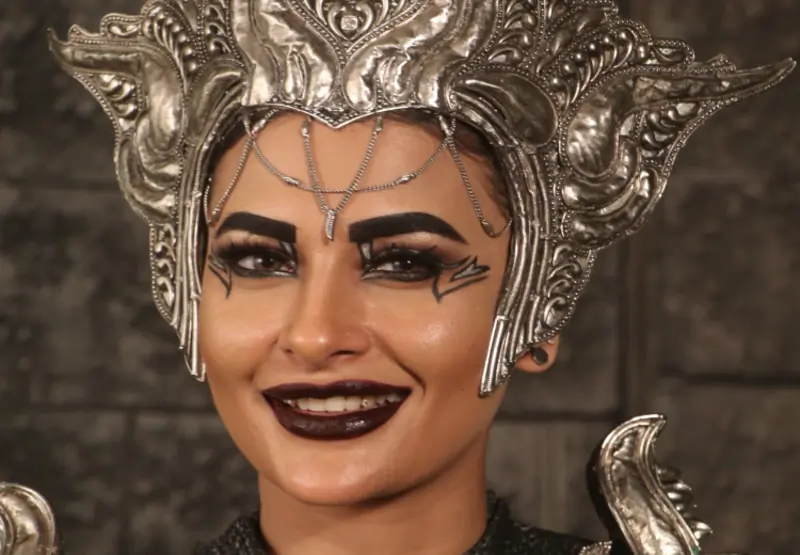
Sony SAB’s upcoming show Baalveer Returns has roped in ace actor Pavitra Punia for the role of the evil power, Timnasa. The power-hungry dictator of the Kaal-Lok, Timnasa’s main aim is to finish the mighty Baalveer. To convey the intensity of the character, Pavitra Punia recently did something completely unbelievable- she got diamonds studded into her teeth.
While Pavitra has done a lot of negative roles previously, she is especially thrilled for her role in Baalveer Returns due to the grandeur of the show. She is working really hard for her role and is going out of her way to bring in more depth to her character. One way of doing that was getting little diamonds embedded in her teeth for that added glamour and villainous feel to the role of Timnasa.
Sharing her excitement, Pavitra said, “Being a part of Sony SAB’s Baalveer Returns is really exciting for me. It’s a unique offering for me as I have never previously done such a fantasy show and I am really looking forward to doing justice to my character as well. To enhance my character of Timnasa even more, and to add to the grandeur of the show, I also got diamonds embedded in my teeth specially. I am fully committed to the show and this character and am just in love with my entire look.”
That's what we call, 'getting into the skin of character', folks!
Join Our WhatsApp Channel
Stay updated with the latest news, gossip, and hot discussions. Be a part of our WhatsApp family now!
Join NowYour reaction
 Nice
Nice Great
Great Loved
Loved LOL
LOL OMG
OMG Cry
Cry Fail
Fail




Related News














Post a comment