

Raj and Avni's first song sequence shot on the sets of Dance India Dance!
Zee TV’s Aur Pyaar Ho Gaya is gearing up for a dream sequence between Raj and Avni which was shot on the sets of popular dance reality show Dance India Dance Season 4...
Published: Friday,Jan 17, 2014 16:14 PM GMT-07:00

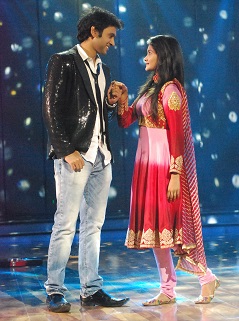 Rajan Shahi's recently launched show Aur Pyaar Ho Gaya on Zee TV, has
recently shot for a dream sequence between Raj (Mishkat Varma) and Avni (Kanchi Singh) on the sets of Dance India Dance Season 4.
Rajan Shahi's recently launched show Aur Pyaar Ho Gaya on Zee TV, has
recently shot for a dream sequence between Raj (Mishkat Varma) and Avni (Kanchi Singh) on the sets of Dance India Dance Season 4.
Our source says, "In the storyline of the show, there will be a sequence wherein, Raj is organizing a rock concert. Due to unavoidable circumstances Raj will be seen performing at the concert as the singer will not turn up at the last moment. Raj will sing the song 'Chahun Main Ya Na' song from Aashiqui 2 and while singing, he dreams of performing on the song with Avni. The entire sequence was shot on the sets of Zee TV's popular dance reality show Dance India Dance Season 4 where Mishkat and Kanchi lived their dream of performing on the stage in real."
When contacted Mishkat, he told us, "It was a superb experience while
shooting for the entire sequence. The set of DID is awesome and it was very
well shot and choreographed in the presence of Rajan Sir. Kanchi and I had a
great fun while shooting for this particular sequence."
Well, it will be interesting for the viewers to see the two on the dance floor.
Anwesha Kamal
Join Our WhatsApp Channel
Stay updated with the latest news, gossip, and hot discussions. Be a part of our WhatsApp family now!
Join NowYour reaction
 Nice
Nice Great
Great Loved
Loved LOL
LOL OMG
OMG Cry
Cry Fail
Fail
















17 Comments